

Mixture of Gaussians (MoG): A tutorial
This notebook gives a short introduction to MultiMin: fitting and visualizing Mixture of Gaussianss (MoG).
Installation and importing
If you’re running this in Google Colab or need to install the package, uncomment and run the following cell:
[1]:
try:
    from google.colab import drive
    %pip install -Uq multimin
except ImportError:
    print("Not running in Colab, skipping installation")
    %load_ext autoreload
    %autoreload 2
!mkdir -p gallery/

# Uncomment to install from GitHub (development version)
# !pip install git+https://github.com/seap-udea/MultiMin.git
Not running in Colab, skipping installation
[2]:
import multimin as mn
mn.show_watermark = True

import matplotlib.pyplot as plt
import plotly.graph_objects as go
from IPython.display import Markdown, display

import numpy as np
np.random.seed(1)
deg = np.pi/180

import warnings
warnings.filterwarnings("ignore")

figprefix = "mog"
Welcome to MultiMin v0.11.2. ¡Al infinito y más allá!
Theoretical background
The core of MultiMin is the Mixture of Gaussians (MoG) defined as:
where \(\tilde U:(u_1,u_2,u_3,\ldots,u_N)\) are random variables and the multivariate normal distribution (MND) \(\mathcal{N}_k(\tilde U; \tilde \mu, \Sigma)\) with mean vector \(\tilde \mu\) and covariance matrix \(\Sigma\) is given by:
The covariance matrix \(\Sigma_{k\times k}\) elements are defined as \(\Sigma_{ij} = \rho_{ij}\sigma_{i}\sigma_{j}\), where \(\sigma_i\) is the standard deviation of \(u_i\) and \(\rho_{ij}\) is the correlation coefficient between variable \(u_i\) and \(u_j\) (\(-1<\rho_{ij}<1\), \(\rho_{ii}=1\)).
The normalization condition implies that the set of weights \(\{w_k\}_M\) are also normalized, i.e., \(\sum_i w_i=1\).
Distribution basics
Below we define and visualize MoGs before using them for fitting.
Univariate normal distribution
The simplest case is a mixture of univariate normals. Here we create a MoG with two Gaussian components:
[3]:
MoG = mn.MixtureOfGaussians(
    mus=[0.0, 2.5],
    Sigmas=[1.0, 0.25],
    weights=[0.2, 0.8]
)
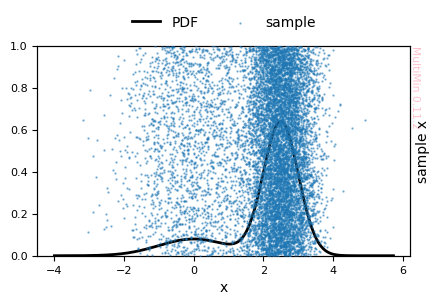
We can plot a sample from the distribution:
[4]:
G = MoG.plot_sample(
    properties=["x"],
    sargs=dict(s=0.5, alpha=0.5),
    figsize=3
)
plt.savefig(f'gallery/{figprefix}_univariate_sample_hist.png')
MixtureOfGaussians.rvs executed in 0.8513691425323486 seconds
[5]:
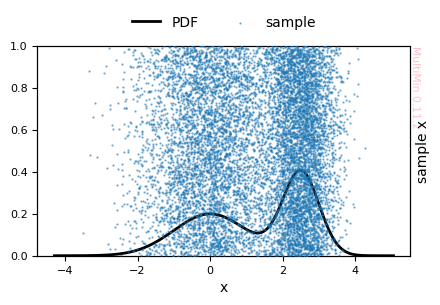
MoG.update_params(
    weights=[0.5, 0.5],
)
G = MoG.plot_sample(
    properties=["x"],
    sargs=dict(s=0.5, alpha=0.5),
    figsize=3
)
MixtureOfGaussians.rvs executed in 0.7406923770904541 seconds
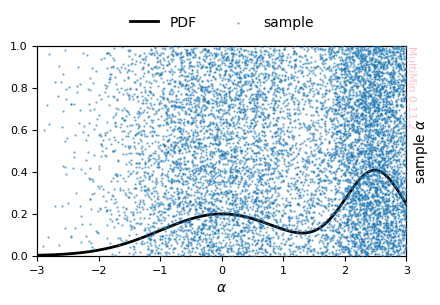
Or you may specify in a more complex way the features of the properties:
[6]:
G = MoG.plot_sample(
    properties=dict(x=dict(label=r"$\alpha$", range=[-3,3])),
    sargs=dict(s=0.5, alpha=0.5),
    figsize=3
)
plt.savefig(f'gallery/{figprefix}_univariate_sample_hist.png')
MixtureOfGaussians.rvs executed in 0.8093640804290771 seconds
Other methods available for this class:
[7]:
MoG.describe()
Available methods for this object/class
================================================
  copy()
    Return a copy of the object.

  drop()
    Drop one of the gaussians. Ex. mog.drop(0)

  get_function()
    Return the source code of ``mog(X)`` and an executable function (type='python'), or LaTeX code with parameters in \begin{array} (type='latex'). Ex. code, mog = MoG.get_function()

  pdf()
    Compute the PDF. Ex. mog.pdf([1.0, 0.5])

  plot_pdf()
    Plot only the PDF of the MoG.

  plot_sample()
    Plot a sample of the MoG. Ex. plot_sample(N=1000, sargs=dict(s=0.5))

  rvs()
    (sin descripción)

  sample_mog_likelihood()
    Compute the negative value of the logarithm of the likelihood of a sample. Ex. mog.sample_mog_likelihood(uparams, data=data, pmap=pmap)

  set_domain()
    Set the support domain for each variable (finite or infinite). Ex. set_domain([None, [0, 1], None])

  set_params()
    Set the properties of the MoG from flatten params. After setting it generate flattend stdcorr and normalize weights. Ex. set_params(params, nvars=2)

  set_sigmas()
    Set the value of list of covariance matrices. After setting Sigmas it update params and stdcorr. Ex. set_sigmas([[[1, 0.2], [0.2, 1]]])

  set_stdcorr()
    Set the properties of the MoG from flatten stdcorr. After setting it generate flattened params and normalize weights. Ex. set_stdcorr(stdcorr, nvars=2)

  tabulate()
    Build a table of MoG parameters: weights, means (mu_i), standard deviations (sigma_i), and correlations (rho_ij, i < j). Diagonal rho_ii are 1 by definition and omitted. Ex. df = MoG.tabulate(sort_by='weight')

  update_params()
    Update MoG parameters in-place using FitMoG-like syntax.
You can generate random samples with rvs:
[8]:
sample = MoG.rvs(5000)
sample[:10]
MixtureOfGaussians.rvs executed in 0.4020729064941406 seconds
[8]:
array([[-0.57475964],
       [ 0.51016492],
       [-0.96013615],
       [ 2.70690677],
       [-0.4472173 ],
       [-0.13701182],
       [-0.45402699],
       [ 2.86373214],
       [ 1.27706175],
       [ 0.37566416]])
You can evaluate the PDF at any point:
[9]:
MoG.pdf(1.3)
[9]:
0.10807882631874657
Multivariate distributions
The main strength of MultiMin is combining multivariate normal distributions. Below we define a MoG with two three-variate normals:
[10]:
weights = [0.5,0.5]
mus = [[1.0, 0.5, -0.5], [1.0, -0.5, +0.5],]
sigmas = [[1, 1.2, 2.3], [0.8, 0.2, 3.3]]
angles = [
    [10*deg, 30*deg, 20*deg],
    [-20*deg, 0*deg, 30*deg],
]
Sigmas = mn.Stats.calc_covariance_from_rotation(sigmas, angles)
MoG = mn.MixtureOfGaussians(mus=mus, weights=weights, Sigmas=Sigmas)
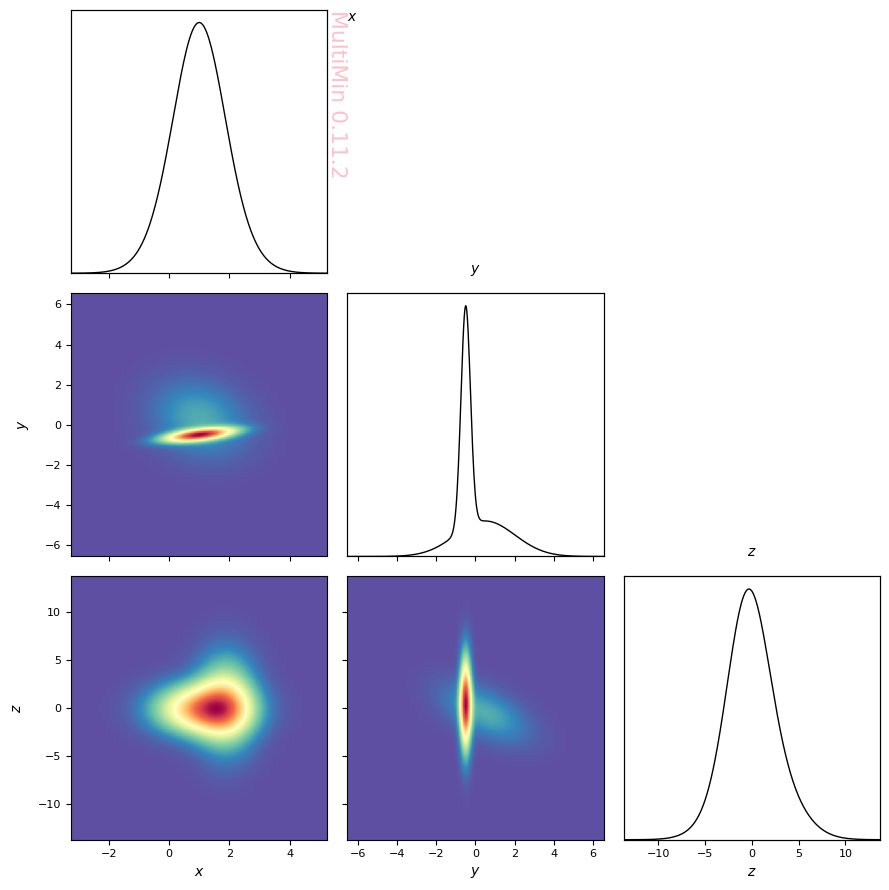
Preview the distribution with a 3D histogram:
[11]:
properties=dict(
    x=dict(label=r"$x$",range=None),
    y=dict(label=r"$y$",range=None),
    z=dict(label=r"$z$",range=None),
)

G = MoG.plot_pdf(
    properties=properties,
    figsize=3,
    grid_size=400,
    colorbar=False,
    cmap="Spectral_r",
    marginals=True,
)
plt.savefig(f'gallery/{figprefix}_3d_sample_density.png')
Another way to visualize the distribution is with MultiPlot, which shows pairwise projections. We use a sample of the data:
[12]:
sample = MoG.rvs(5000)
MixtureOfGaussians.rvs executed in 0.6316561698913574 seconds
Plot the sample (2D histograms and scatter on the panels):
[13]:
G=mn.MultiPlot(properties,figsize=3, marginals=True)

G.mog_pdf(MoG)
G.mog_contour(MoG, levels=50, linewidth=0.1,alpha=0.3)

hargs=dict(bins=30,cmap='Spectral_r')
#hist=G.sample_hist(sample,**hargs)

sargs=dict(s=0.5,edgecolor='None',color='r')
hist=G.sample_scatter(sample,**sargs)

plt.savefig(f'gallery/{figprefix}_data_density_scatter.png')
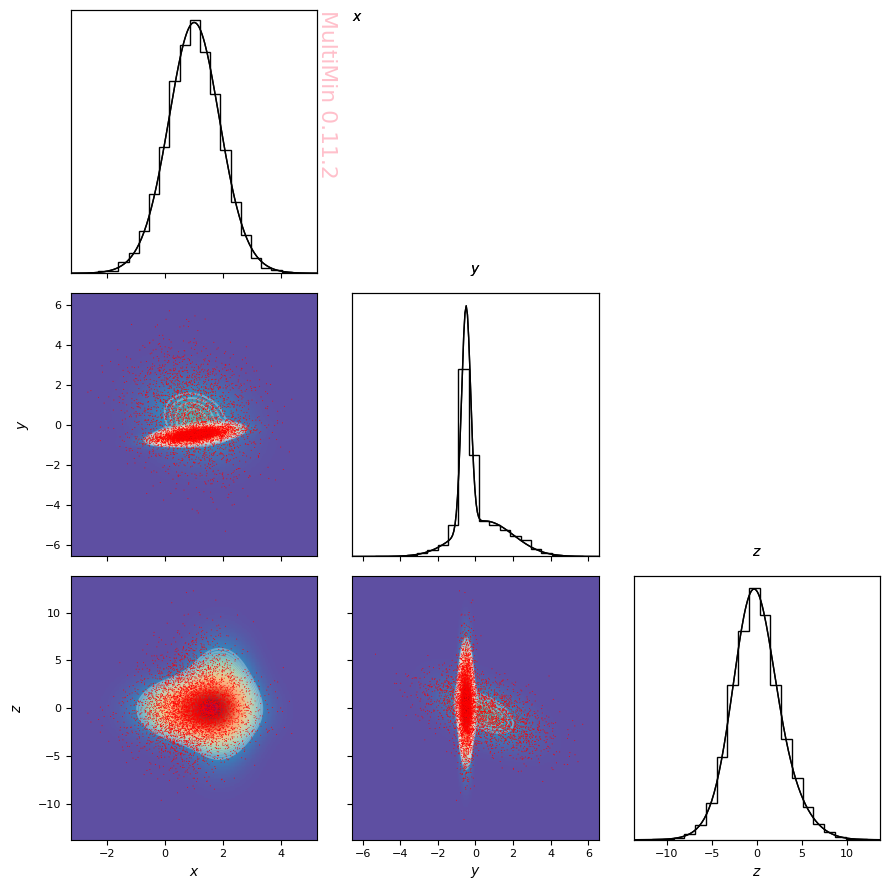
MultiPlot can also be used for univariate distributions (single-panel histogram and scatter):
[14]:
MoG = mn.MixtureOfGaussians(
    mus=[0.0, 2.5],
    Sigmas=[1.0, 0.25],
    weights=[0.5, 0.5]
)

sample = MoG.rvs(5000)

properties=dict(
    x=dict(label=r"$\mu$",range=None),
)

G=mn.MultiPlot(properties,figsize=3)

G.mog_pdf(MoG, alpha=0.2)

G.sample_hist(
    sample,
    **dict(bins=30,cmap='Spectral_r', alpha=0.3),
)

sargs=dict(s=1.2,edgecolor='None',color='r')
G.sample_scatter(
    sample,
    **dict(s=1.2,edgecolor='None',color='r',alpha=0.2),
)
plt.savefig(f'gallery/{figprefix}_univariate_density_2gauss.png')
MixtureOfGaussians.rvs executed in 0.31572604179382324 seconds
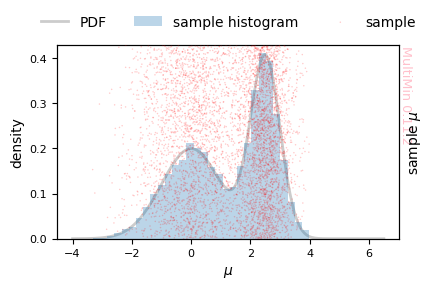
Fitting data with MoG
We fit by minimizing the negative normalized log-likelihood
over the MoG parameters. Lower values indicate a better fit.
This notebook demonstrates how to use the multimin.multimin module for handling multidimensional distributions, specifically designed for asteroid population analysis.
Univariate normals
The goal of MultiMin is to fit a MoG to a given dataset. We start with a univariate example by generating data from a MoG and then fitting it:
[15]:
# Create the distribution
MoG = mn.MixtureOfGaussians(
    mus=[0.0, 2.5],
    Sigmas=[1.0, 0.25],
    weights=[0.5, 0.5]
)

# Generate data
sample = MoG.rvs(10000)

# Plot the data
G = mn.MultiPlot(dict(x=dict(label=r"$\chi_\mathrm{min}$",range=None)),figsize=3)
G.sample_hist(sample,**dict(bins=30))
plt.savefig(f'gallery/{figprefix}_univariate_histogram.png')
MixtureOfGaussians.rvs executed in 0.6484818458557129 seconds
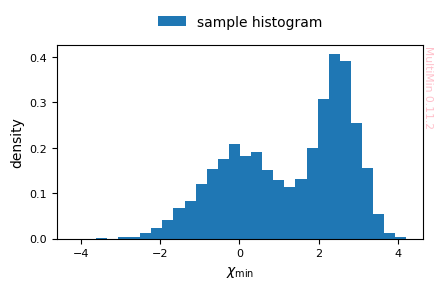
Fit with a single Gaussian component:
[16]:
F = mn.FitMoG(data=sample, ngauss=1)
Loading a FitMoG object.
Number of gaussians: 1
Number of variables: 1
Number of dimensions: 1
Number of samples: 10000
Log-likelihood per point (-log L/N): 2.2970198330802165
Run the fitting procedure (use progress="tqdm" for better convergence):
[17]:
F.fit_data(progress="tqdm")
FitMoG.fit_data executed in 0.13362908363342285 seconds
Plot the fit result (histogram of data and fitted PDF):
[18]:
# Univariate: hargs → histogram of sample; fit shown as PDF
F.plot_fit(
    properties=["u"],
    hargs=dict(bins=30),
    sargs=dict(s=0.5,edgecolor='None',color='r'),
    pargs=dict(color='b'),
    figsize=3
)
plt.savefig(f'gallery/{figprefix}_univariate_fit_1gauss.png')
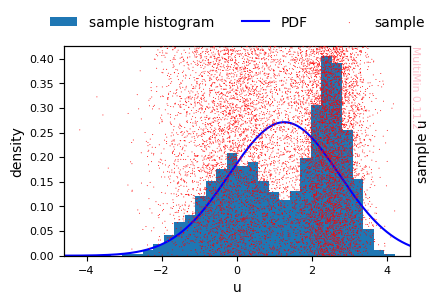
A single Gaussian cannot capture the bimodal shape.
Fitting with two Gaussians:
[19]:
F = mn.FitMoG(data=sample, ngauss=2)
F.fit_data()
print(f"Log-likelihood per point (-log L/N) after fit: ",F.norm_log_l())
# Univariate: no hargs → scatter of sample; fit shown as PDF
F.plot_fit(
    properties=["u"],
    sargs=dict(s=0.5, edgecolor='None', color='r'),
    figsize=3
)
plt.savefig(f'gallery/{figprefix}_univariate_fit_2gauss.png')
Loading a FitMoG object.
Number of gaussians: 2
Number of variables: 1
Number of dimensions: 2
Number of samples: 10000
Log-likelihood per point (-log L/N): 2.2970198330802165
FitMoG.fit_data executed in 0.09199881553649902 seconds
Log-likelihood per point (-log L/N) after fit:  1.635612507663419
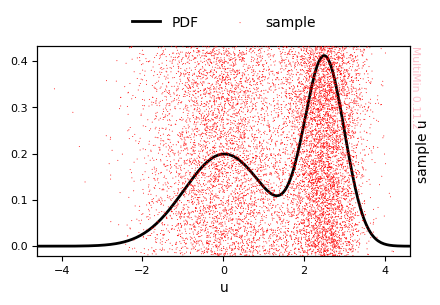
Visual inspection shows that the fitted distribution matches the sample well. For a quantitative check we can compare the true and fitted parameters:
[20]:
MoG.tabulate('distance')
[20]:
| w | mu_1 | sigma_1 | |
|---|---|---|---|
| component | |||
| 1 | 0.5 | 0.0 | 1.00 |
| 2 | 0.5 | 2.5 | 0.25 |
[21]:
F.mog.tabulate('distance')
[21]:
| w | mu_1 | sigma_1 | |
|---|---|---|---|
| component | |||
| 2 | 0.500526 | 0.025683 | 1.004006 |
| 1 | 0.499474 | 2.508023 | 0.244823 |
The tables confirm that the fitted parameters are close to the true ones.
You can export the fitted MoG as a callable function for use in other code:
[22]:
code, mog = F.mog.get_function()
from multimin import Util

def mog(X):

    mu1_1 = 2.508023
    sigma1_1 = 0.494796
    n1 = Util.nmd(X, mu1_1, sigma1_1)

    mu2_1 = 0.025683
    sigma2_1 = 1.002001
    n2 = Util.nmd(X, mu2_1, sigma2_1)

    w1 = 0.499474
    w2 = 0.500526

    return (
        w1*n1
        + w2*n2
    )
Evaluate the fitted PDF at a point:
[23]:
mog(0.2)
[23]:
np.float64(0.1962968566936807)
Multivariate data
We can run a similar workflow for multivariate data:
[24]:
weights = [0.5,0.5]
mus = [[1.0, 0.5, -0.5], [1.0, -0.5, +0.5],]
sigmas = [[1, 1.2, 2.3], [0.8, 0.2, 3.3]]
angles = [
    [10*deg, 30*deg, 20*deg],
    [-20*deg, 0*deg, 30*deg],
]
Sigmas = mn.Stats.calc_covariance_from_rotation(sigmas, angles)

MoG = mn.MixtureOfGaussians(mus=mus, weights=weights, Sigmas=Sigmas)

sample = MoG.rvs(5000)
MixtureOfGaussians.rvs executed in 0.43866991996765137 seconds
First, fit with a single multivariate normal:
[25]:
F = mn.FitMoG(data=sample, ngauss=1)
F.fit_data(progress="tqdm")
Loading a FitMoG object.
Number of gaussians: 1
Number of variables: 3
Number of dimensions: 3
Number of samples: 5000
Log-likelihood per point (-log L/N): 11.414133112430706
FitMoG.fit_data executed in 0.1270902156829834 seconds
Check the fit (one Gaussian cannot capture two modes):
[26]:
G=F.plot_fit(
    properties=["x","y","z"],
    sargs=dict(s=0.2,edgecolor='None',color='r'),
    pargs=dict(cmap='YlGn'),
    cargs=dict(),
    figsize=3,
    marginals=True,
)

plt.savefig(f'gallery/{figprefix}_fit_2gauss_3d.png')
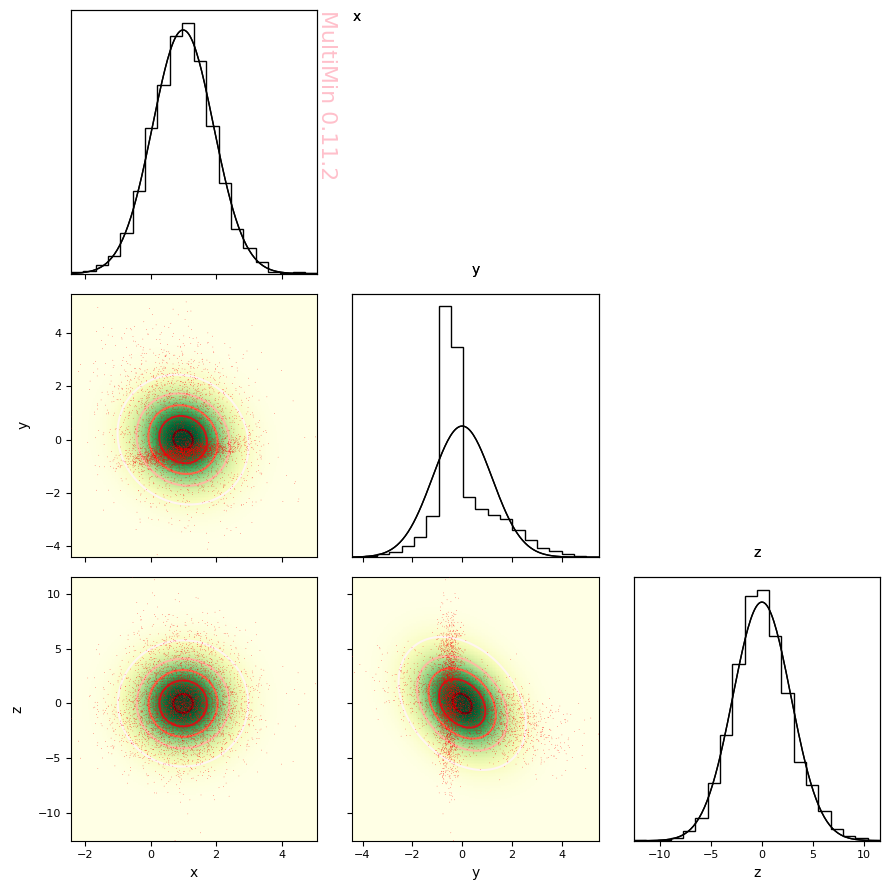
Although we can evaluate visually that the fit is not good, we can better check the goodness of fit using a Kolmogorov-Smirnov test.
[27]:
ks, R2 = F.quality_of_fit(plot_qq=True)
plt.savefig(f"gallery/{figprefix}_plot_qq_mog.png")
MixtureOfGaussians.rvs executed in 2.660444974899292 seconds
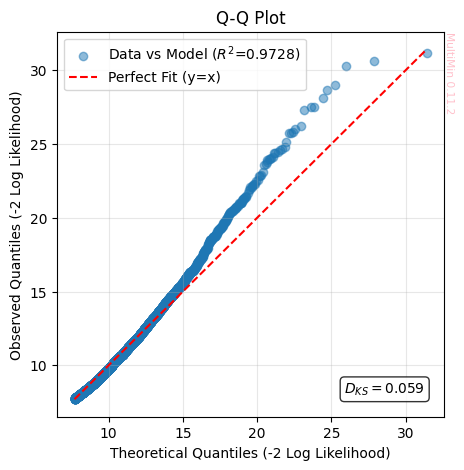
the Kolmogorov-Smirnov Statistic (:math:`D_{KS}`) Measures the maximum absolute distance between the Cumulative Distribution Function (CDF) of the data and that of the model. It represents the “worst point” of local deviation.
The range of the statistics is \(D_{KS}\in[0, 1]\), where an acceptable value is \(D_{KS}\approx 0\) (Ideally \(< 0.05\)).
The Q-Q plot is a non-parametric visual diagnostic tool used to assess whether a set of observed data follows a specific theoretical distribution (or a model simulation). For making it we compare the distribution of the Negative Log-Likelihood (\(-\ln \mathcal{L}\)) of the real data against the model’s prediction. The plot confronts the quantiles of the empirical distribution (data) against the quantiles of the reference distribution (model).
If two distributions \(F_{obs}\) and \(F_{model}\) are identical, then for any probability \(p\), their inverses (the quantiles) must match. Therefore, the points \((x, y) = (Q_{model}, Q_{obs})\) should align on the identity line \(y = x\). Since visualizing an \(N\)-dimensional space is impossible for humans, we use the Log-Likelihood as a dimensionality reduction technique. We collapse the vector \(\vec{x}\) into a scalar \(S = -2 \ln \mathcal{L}(\vec{x})\). If the Q-Q plot of \(S\) is correct, we have strong assurance that the model correctly captures the internal correlations and structure of the n-tuples.
Ideal Fit (On the :math:`y=x` line): The distribution of “rarity” in the observed events perfectly matches the model’s prediction. The fit is statistically valid.
Tail Deviation (Curved ends): Points diverging at the extremes (top right or bottom left) indicate “Heavy Tails” (more outliers than predicted) or “Light Tails” (fewer outliers than predicted).
Shift or Wrong Slope: Indicates systematic errors in the mean (displacement) or variance (scale) of the model.
The Coefficient of Determination on Identity (:math:`R^2`) measures the variance explained by the model with respect to the ideal line \(y=x\). It penalizes both dispersion and bias (displacement) of the prediction.
The range of the statistics is \(R^2\in(-\infty, 1]\), where an acceptable value is \(R^2\approx 1\) (Ideally \(> 0.9\)).
In all the metrics, the fit to a single gaussian is poor for the considered data.
Fitting with two Gaussians gives a much better result:
[28]:
F = mn.FitMoG(data=sample, ngauss=2)
F.fit_data(progress="tqdm")
G=F.plot_fit(
    properties=["x","y","z"],
    pargs=dict(cmap='Spectral_r'),
    sargs=dict(s=0.2,edgecolor='None',color='w',nbins=30),
    cargs=dict(levels=50,zorder=+300,alpha=0.3),
    figsize=3,
    marginals=True
)

plt.savefig(f'gallery/{figprefix}_fit_result_3d.png')
Loading a FitMoG object.
Number of gaussians: 2
Number of variables: 3
Number of dimensions: 6
Number of samples: 5000
Log-likelihood per point (-log L/N): 11.414133112430706
FitMoG.fit_data executed in 0.5385608673095703 seconds
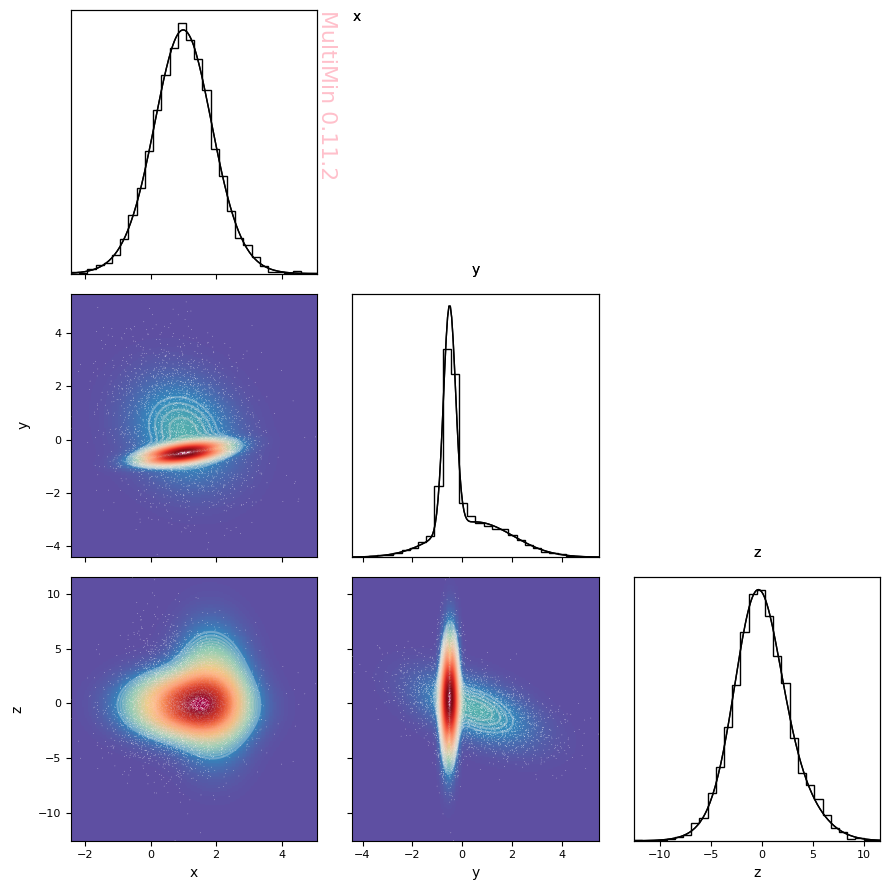
Much better! At least visually. Let’s evaluate the quality of fit quantitatively.
[29]:
ks, R2 = F.quality_of_fit(plot_qq=True)
plt.savefig(f"gallery/{figprefix}_plot_qq_mog_full.png")
MixtureOfGaussians.rvs executed in 3.3428080081939697 seconds
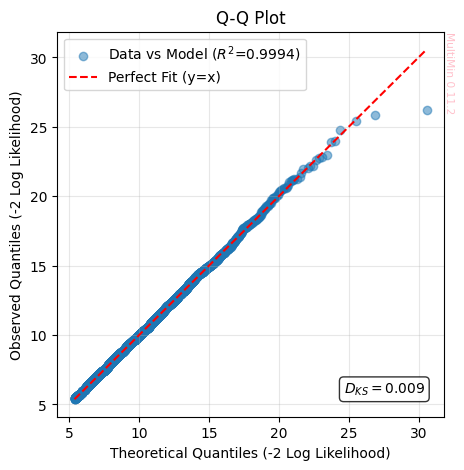
Wonderful!
Check the initial and final distributions:
Compare the true and fitted MoG parameters (e.g. means and weights):
[30]:
MoG.tabulate('distance')
[30]:
| w | mu_1 | mu_2 | mu_3 | sigma_1 | sigma_2 | sigma_3 | rho_12 | rho_13 | rho_23 | |
|---|---|---|---|---|---|---|---|---|---|---|
| component | ||||||||||
| 1 | 0.5 | 1.0 | 0.5 | -0.5 | 1.064392 | 1.510773 | 2.077169 | -0.211137 | 0.101191 | -0.534075 |
| 2 | 0.5 | 1.0 | -0.5 | 0.5 | 0.788611 | 0.241023 | 3.300000 | 0.539822 | 0.000000 | 0.000000 |
[31]:
F.mog.tabulate('distance')
[31]:
| w | mu_1 | mu_2 | mu_3 | sigma_1 | sigma_2 | sigma_3 | rho_12 | rho_13 | rho_23 | |
|---|---|---|---|---|---|---|---|---|---|---|
| component | ||||||||||
| 2 | 0.503237 | 1.001685 | -0.504055 | 0.534949 | 0.788532 | 0.241555 | 3.349363 | 0.529687 | -0.008064 | 0.046706 |
| 1 | 0.496763 | 0.977029 | 0.528189 | -0.558262 | 1.059248 | 1.517444 | 2.067635 | -0.205607 | 0.090194 | -0.530379 |
The agreement is as expected for a good fit.
You can obtain the fitted PDF as explicit code or a callable:
[32]:
code, pymog = F.mog.get_function(cmog=False)
from multimin import Util

def mog(X):

    mu1_1 = 0.977029
    mu1_2 = 0.528189
    mu1_3 = -0.558262
    mu1 = [mu1_1, mu1_2, mu1_3]
    Sigma1 = [[1.122005, -0.330481, 0.197538], [-0.330481, 2.302636, -1.664074], [0.197538, -1.664074, 4.275116]]
    n1 = Util.nmd(X, mu1, Sigma1)

    mu2_1 = 1.001685
    mu2_2 = -0.504055
    mu2_3 = 0.534949
    mu2 = [mu2_1, mu2_2, mu2_3]
    Sigma2 = [[0.621782, 0.100891, -0.021299], [0.100891, 0.058349, 0.037788], [-0.021299, 0.037788, 11.218229]]
    n2 = Util.nmd(X, mu2, Sigma2)

    w1 = 0.496763
    w2 = 0.503237

    return (
        w1*n1
        + w2*n2
    )
LaTeX outputs
For papers or reports you can export the fitted function in LaTeX:
[33]:
function, _ = F.mog.get_function(type='latex')
display(Markdown(function))
$$f(\mathbf{x}) = w_1 \, \mathcal{N}(\mathbf{x}; \boldsymbol{\mu}_1, \mathbf{\Sigma}_1) + w_2 \, \mathcal{N}(\mathbf{x}; \boldsymbol{\mu}_2, \mathbf{\Sigma}_2)$$

where

$$w_1 = 0.496763$$
$$\boldsymbol{\mu}_1 = \left( \begin{array}{c} 0.977029 \\ 0.528189 \\ -0.558262 \end{array}\right)$$
$$\mathbf{\Sigma}_1 = \left( \begin{array}{ccc} 1.122005 & -0.330481 & 0.197538 \\ -0.330481 & 2.302636 & -1.664074 \\ 0.197538 & -1.664074 & 4.275116 \end{array}\right)$$

$$w_2 = 0.503237$$
$$\boldsymbol{\mu}_2 = \left( \begin{array}{c} 1.001685 \\ -0.504055 \\ 0.534949 \end{array}\right)$$
$$\mathbf{\Sigma}_2 = \left( \begin{array}{ccc} 0.621782 & 0.100891 & -0.021299 \\ 0.100891 & 0.058349 & 0.037788 \\ -0.021299 & 0.037788 & 11.218229 \end{array}\right)$$

Here the normal distribution is defined as:

$$\mathcal{N}(\mathbf{x}; \boldsymbol{\mu}, \mathbf{\Sigma}) = \frac{1}{\sqrt{(2\pi)^{{k}} \det \mathbf{\Sigma}}} \exp\left[-\frac{1}{2}(\mathbf{x}-\boldsymbol{\mu})^{\top} \mathbf{\Sigma}^{{-1}} (\mathbf{x}-\boldsymbol{\mu})\right]$$
where
Here the normal distribution is defined as:
You can also output the parameter table in LaTeX:
[34]:
latex_table = F.mog.tabulate(type='latex')
\begin{table*}
\begin{tabular}{lrrrrrrrrrr}
\hline
$k$ & $w$ & $\mu_{1}$ & $\mu_{2}$ & $\mu_{3}$ & $\sigma_{1}$ & $\sigma_{2}$ & $\sigma_{3}$ & $\rho_{12}$ & $\rho_{13}$ & $\rho_{23}$ \\
\hline
2 & 0.5032 & 1.002 & -0.5041 & 0.5349 & 0.7885 & 0.2416 & 3.349 & 0.5297 & -0.008064 & 0.04671 \\
1 & 0.4968 & 0.977 & 0.5282 & -0.5583 & 1.059 & 1.517 & 2.068 & -0.2056 & 0.09019 & -0.5304 \\
\hline
\end{tabular}
\end{table*}
MultiMin - Multivariate Gaussian fitting
© 2026 Jorge I. Zuluaga